


With the latest Media Center update, many power users learned that their customizations aren’t supported and were removed. While MS certainly has no requirement to support community hacks, it’s too bad this had to happen. What should be seen as the addition of some decent content has been marred and turned into a bit of a witch hunt by some.
Either way, there’s a fix available and it worked for me this morning so I thought it would be good to share. All it takes is the renaming of one file and you should be all set. Since making the change this morning, I haven’t seen one issue even though Media Center hasn’t replaced it. Neither myself nor anyone else who has done this will guarantee that you won’t hose your Media Center however. Working for one doesn’t mean working for all. You can find a forum thread related to the fix here, but see below for screen shots.
Navigate to ProgramData—>Microsoft—>eHome—>Packages—>MCEClientUX—>dSM. Within this folder there’s one file: StartResources.dll:
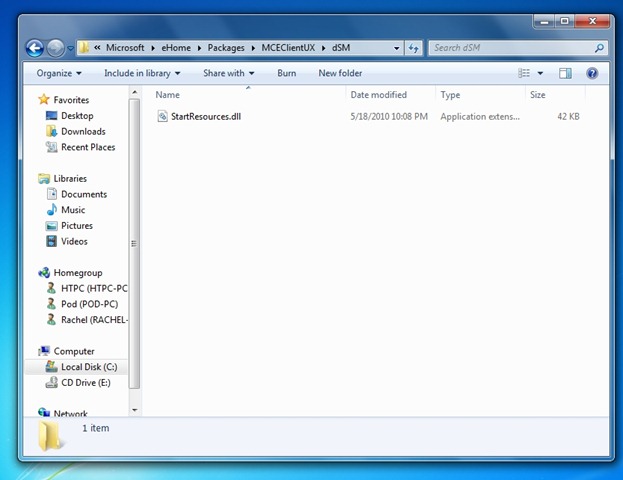
Make sure that Media Center isn’t running before you do this too. Simply rename the file to StartResources.old.dll. That’s it. Close up your explorer window and head into MC.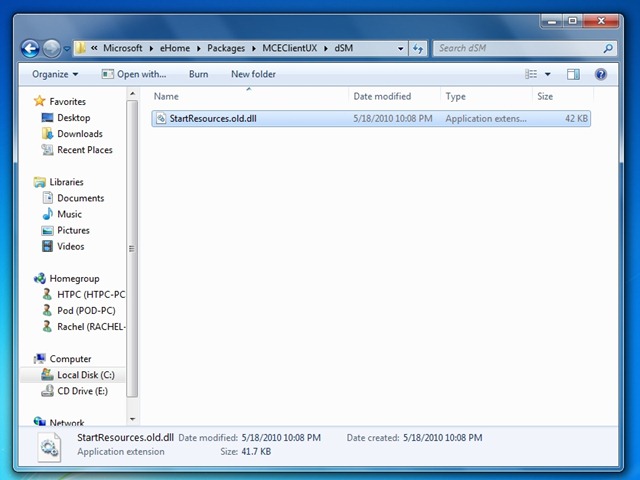
That should be it. Once you’ve made this quick file name change you should be all set to work on getting your menus working to your liking again. I only had to make a few adjustments to mine. Depending on what changes you’ve made since your customizations went on walkabout you may need to do more or less playing around to get things back up to snuff.
Hopefully this fix gets you going with your customizations again. If you’ve found another method or had trouble with this one, be sure and leave a comment for others!


I looked at the Australian Media Center site and it looks like not much progress has been done to resolve this issue. None of the recommended fixes work for me on a win7 x64 system even after going back to a back up from day two (WHS), this box is a fairly new build. Does anyone recommend reinstall of win 7, then appling the x.old.dll fix, then continue with the fresh install?
[…] Fixing Custom Menus in Windows 7 Media Center […]